

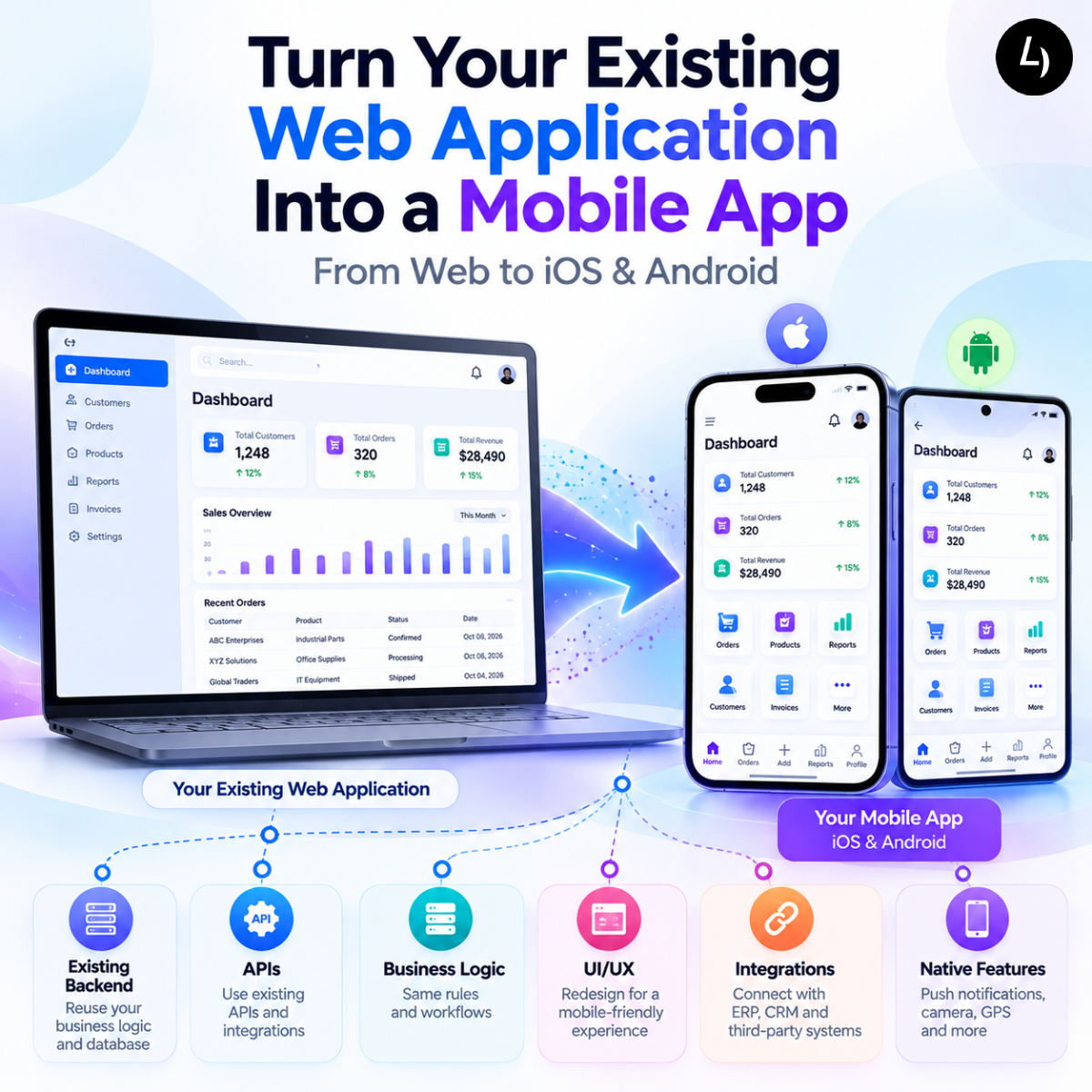
How to Turn Your Existing Website or Web Application into a Mobile App
If your business already has a successful website or web application, you may be considering the next step: turning it into a mobile app for iOS and Android.
A mobile application can make your services, business processes, customer portal, or digital product more accessible to users who prefer smartphones and tablets.
But does building a mobile app mean starting the entire project again?
Not necessarily.
Depending on how your existing website or web application was built, you may be able to reuse your backend, APIs, business logic, database, authentication system, and even parts of the frontend.
The key is to first understand what you already have and then determine the most suitable approach for mobile.
This guide explains how to convert a website or web application into a mobile app, what can potentially be reused, which development approaches you can consider, and what to evaluate before starting the project.
Can You Convert an Existing Website Into a Mobile App?
Yes, but the process depends on the type of website or application you have.
A basic business website may primarily contain:
- Company information
- Services
- Product pages
- Blog content
- Contact forms
A web application is considerably more interactive and may include:
- User accounts
- Dashboards
- Orders
- Payments
- Reports
- Customer portals
- Employee workflows
- Business data
- ERP or CRM integrations
If you have a full web application, there may already be significant functionality that can support your mobile strategy.
However, converting a website into a mobile app should not simply mean displaying the website inside a phone screen.
A successful mobile application should provide an experience designed around mobile users, their workflows, and the capabilities of their devices.
What Can You Reuse From Your Existing Web Application?
One of the biggest advantages of extending an existing web application to mobile is the possibility of reusing parts of your existing technology.
The amount of reuse depends on your current architecture.
Backend and Database
Your existing backend may already manage:
- Customers
- Users
- Products
- Orders
- Transactions
- Business rules
- Workflows
- Reports
If the backend is well structured, there may be no need to recreate these systems specifically for mobile.
APIs
APIs can allow your mobile application to communicate with the same backend used by your website.
For example:
Web Application → API → Backend
can become:
Web Application + Mobile App → API → Backend
This allows multiple platforms to work with the same business data and services.
Authentication
Existing login and user-management systems may also be extended to support mobile users.
Business Logic
Where business rules are implemented on the backend, the same logic can potentially serve both the web and mobile applications.
This can reduce duplicated development and help maintain consistent business processes.
Step 1: Assess Your Existing Website or Web Application
Before deciding how to build the mobile app, conduct a technical and functional assessment of the existing system.
Important areas to review include:
- Frontend technology
- Backend technology
- APIs
- Database architecture
- Authentication
- User roles and permissions
- Third-party integrations
- Business workflows
- Security
- Hosting and infrastructure
- Mobile responsiveness
This assessment helps determine whether the existing application is ready to support mobile or whether some modernization is required first.
For example, an application with a well-designed API layer may be relatively straightforward to extend to mobile.
An older application where most functionality is tightly connected to the web interface may require additional backend or architectural work.
Step 2: Define What the Mobile App Actually Needs
One of the biggest mistakes businesses make is trying to transfer every website feature to the mobile application.
You don’t necessarily need to.
Instead, identify what your mobile users actually need to accomplish.
Ask:
- Who will use the app?
- What tasks do they perform most frequently?
- Which information needs to be available on mobile?
- Which workflows are time-sensitive?
- Which features require access to device capabilities?
- Which desktop features are unnecessary on smartphones?
For example, an employee web application may contain dozens of features, while its mobile version might focus on:
Dashboard → Tasks → Approvals → Notifications → Profile
A customer application might focus on:
Products → Orders → Payments → Documents → Support
Defining the mobile scope early can help reduce unnecessary development effort and create a much better user experience.
Step 3: Choose the Right Mobile Development Approach
Once the existing system and mobile requirements are understood, the next step is choosing the appropriate development approach.
There is no single solution that works for every project.
React.js + Capacitor
If your existing web application is built with React.js, React.js + Capacitor can be an attractive option.
Capacitor allows web applications to run as mobile applications while providing access to native device capabilities.
A simplified architecture looks like:
React.js Application → Capacitor → iOS + Android
This approach can be particularly useful when:
- You already have a React.js application
- You need both web and mobile platforms
- Code reuse is important
- Your application primarily uses standard business functionality
- You need access to capabilities such as camera, GPS, notifications, or device storage
The amount of reusable code depends on how the existing application was designed.
React Native
React Native is another cross-platform mobile development option.
It can be a strong choice when mobile is a major part of the product or when the application requires a more mobile-focused development approach.
React Native may be particularly appropriate when the product relies heavily on mobile-specific interactions or native device capabilities.
Native iOS and Android Development
For applications with highly specialized platform requirements, separate native development may sometimes be appropriate.
The important point is to select the technology after evaluating the requirements, rather than deciding on a framework first and trying to fit the application around it.
Step 4: Reuse Your Existing APIs and Business Systems
If your existing web application already communicates with an ERP, CRM, accounting platform, payment gateway, or another business system, those integrations may become part of your mobile architecture.
For example:
Mobile App → API Layer → ERP / CRM
The mobile application could then access:
- Customer information
- Product data
- Inventory
- Orders
- Invoices
- Payments
- Service requests
- Employee information
However, existing APIs should be reviewed before being used by a mobile application.
They should provide appropriate:
- Authentication
- Authorization
- Data validation
- Performance
- Security
- Error handling
- Scalability
A technical API assessment can identify changes required before mobile development begins.
Step 5: Redesign the Experience for Mobile
A desktop application and a mobile application should not necessarily look identical.
Desktop users may have large screens, keyboards, and multiple windows available.
Mobile users expect:
- Simple navigation
- Touch-friendly controls
- Shorter workflows
- Clear information
- Fast access to important functions
- Responsive interfaces
- Convenient notifications
For example, a desktop application might display a large data table with many columns.
On mobile, the same information could be presented using:
Summary → Filter → Card → Details
This is why mobile UI/UX design should be treated as an important part of the conversion process.
The objective is not to shrink the desktop application.
The objective is to create a mobile experience that makes the most important tasks easier.
Step 6: Add Mobile-Specific Capabilities
Moving from web to mobile also creates opportunities to use device capabilities that are not normally available through a standard browser experience.
Depending on your application, you may consider:
Push Notifications
Useful for:
- Approvals
- Order updates
- Reminders
- New messages
- Service notifications
GPS and Location
Useful for:
- Field service
- Delivery
- Sales teams
- Attendance
- Location-based services
Camera
Useful for:
- Document scanning
- Product images
- Expense receipts
- Proof of delivery
- Barcode scanning
Biometric Authentication
Fingerprint or face authentication can provide convenient access to applications where appropriate.
Offline Functionality
Offline access can be valuable for employees and field teams working in locations with unreliable internet connectivity.
These capabilities can turn an existing web application into a significantly more useful mobile solution.
Step 7: Test Across Devices and Platforms
A mobile application needs to be tested beyond simply checking whether the existing web functionality works.
Testing may include:
- Functional testing
- API testing
- iOS testing
- Android testing
- Device compatibility testing
- Different screen sizes
- Performance testing
- Security testing
- Notification testing
- Offline testing
- Integration testing
- User acceptance testing
The exact device and operating system coverage should be based on your target users.
Testing early and throughout development can reduce the risk of expensive problems after launch.
How Much Does It Cost to Convert a Website Into a Mobile App?
There is no standard website-to-mobile-app development cost.
The investment depends on the condition of the existing application and the functionality required in the mobile version.
Important factors include:
- Existing technology stack
- Application architecture
- Amount of reusable code
- Number of mobile screens
- New functionality
- Backend and API requirements
- UI/UX redesign
- ERP and CRM integrations
- Device features
- Security
- Testing
- Deployment
- Ongoing maintenance
An existing web application with modern APIs and a well-structured architecture may require considerably less redevelopment than an older application that needs significant modernization.
The most reliable way to estimate the project is through a technical discovery and requirements assessment.
How Long Does It Take to Convert a Web App Into a Mobile App?
The timeline depends on the complexity of the existing application and the scope of the mobile solution.
A relatively focused application may take a few months, while a complex business platform with multiple integrations, user roles, offline functionality, and advanced mobile features can require substantially more time.
The development schedule can be affected by:
- Existing architecture
- Number of screens
- Feature complexity
- API development
- UI/UX requirements
- Third-party integrations
- Native device features
- Testing
- App Store and Google Play requirements
- Scope changes
A technical assessment before development can provide a much more realistic timeline.
Benefits of Turning an Existing Web Application Into a Mobile App
Extending an existing web application to mobile can provide several business advantages.
Reach Customers on Their Preferred Devices
A mobile application gives customers another convenient channel for accessing your products and services.
Improve Employee Mobility
Sales teams, field workers, managers, and service employees can access business information while away from their desks.
Reuse Existing Technology
Your backend, APIs, database, authentication, and business processes may be reusable.
Improve Engagement
Push notifications and mobile-specific functionality can make important information more accessible.
Extend Your Digital Product
A mobile application can complement your existing web platform rather than replacing it.
Create a Better Mobile Experience
Instead of asking users to navigate a desktop-oriented website on a phone, you can design workflows specifically for mobile usage.
Common Mistakes When Converting a Website to a Mobile App
Simply Wrapping the Website
A mobile app should provide a meaningful mobile experience rather than simply opening the existing website inside an application shell.
Moving Every Feature to Mobile
Focus on the workflows that provide the most value to mobile users.
Ignoring Existing APIs
Your current backend and API architecture may offer significant opportunities for reuse.
Choosing a Framework Before Defining Requirements
React.js + Capacitor, React Native, and native development each have different strengths.
Underestimating Testing
Different devices, screen sizes, operating systems, and network conditions can affect the user experience.
Ignoring Future Growth
The mobile architecture should be capable of supporting new features and increasing user demand.
Why Choose 4devnet for Web-to-Mobile App Development?
At 4devnet, we help businesses extend existing websites, web applications, and business systems into modern mobile experiences.
Our approach begins with understanding the existing application, technology stack, business workflows, APIs, integrations, users, and mobile requirements.
Our capabilities include:
- React.js development
- React.js + Capacitor development
- Cross-platform mobile app development
- React Native development
- Custom iOS and Android applications
- API development and integration
- ERP and CRM integration
- Business and enterprise applications
- Application modernization
- Backend development
We can help determine what can be reused, what should be redesigned, and which mobile development approach is most appropriate for your application.
From technical assessment and UI/UX design through development, integration, testing, deployment, and ongoing support, we can support the complete web-to-mobile development lifecycle.
Ready to Turn Your Web Application Into a Mobile App?
You may not need to rebuild your digital platform from the ground up.
With the right architecture and development strategy, your existing backend, APIs, business logic, and data can potentially become the foundation for a mobile application.
If you already have a website or web application and are considering launching an iOS and Android app, the best starting point is to evaluate your existing system and define what your mobile users actually need.
Planning to convert your website or web application into a mobile app?
Let’s review your existing system and determine the right technology, architecture, and development strategy for your business.
Book a Free Consultation